


![Kaspersky KIS/KAV 2010 + New Keys! [1st JAN - 5 KB ONLY]](http://i50.tinypic.com/ilk21x.jpg "Kaspersky KIS/KAV 2010 + New Keys! [1st JAN - 5 KB ONLY]")


09:11 | 0
Comments | Read More

Wise Disk Cleaner 4.91
Written By ISLAM ZAIN on 5 Jan 2010 | 11:58
 Wise Disk Cleaner is a free to use, easy to use, fast and easy to use application developed to free space by deleting junk files that are no longer used by any software on your system. Even the least experienced user to easily remove junk files with this tool.
Wise Disk Cleaner scans junk files and delete these junk files in the Windows system, your system can work better and faster.
Wise Disk Cleaner can scan more than 50 types of junk files, and you can freely add and type of junk file which
you consider.
After Wise Disk Cleaner analyzes your system to find junk files, you can individually view each of found junk files and then call a detailed description. If you wish, you can also use the rehabilitation of all junk files automatically.

11:58 | 0
Comments | Read More
K-Lite Codec Pack Full 5.5.8 Beta
 K-Lite Codec Pack is a collection of codecs and related tools. Codec is short for Compressor-decompressor. Codecs are needed for encoding and decoding (playing) audio and video. The K-Lite Codec Pack is a user-friendly solution for playing all your movie files on the system. The K-Lite Codec Pack you should be able to play all the popular movie formats and even some rare formats.
The K-Lite Codec Pack has a couple of major advantages compared to other codec packs
It is always very up-to-date with the latest versions of the codecs.
It is very user friendly and the installation is fully customizable so that you can install only those components that you really want.
It has been very well tested, so that the package does not contain any conflicting codecs installed.
It is a very comprehensive package includes everything you need to play your movies.
This Full Pack contains even more codecs. It also has encoding support for various formats. This package is for power users and people who do their own encodings
Players
Media Player Classic Home Cinema 1.3.1430.0
Media Player Classic Home Cinema 1.3.1430.0 - This is a full-featured player with many useful options and features. It has internal filters for the opening of the various container formats like MP4, Matroska, Ogg and flv. It is also able to play, QuickTime and RealMedia content if those frameworks are installed. The Home Cinema version has internal DXVA decoders for H.264 and VC-1 video.
ffdshow
ffdshow revision 3166 - ffdshow is a very powerful DirectShow filter that can decode many audio and video formats. It also includes many opportunities for manipulation of audio and video, such as resizing and post-processing. Examples of supported video formats are: DivX, Xvid, MPEG-4, H.264/AVC, MPEG-2, VC-1, H.263, FLV1, flv4, VP3, VP6, Theora, SVQ1, SVQ3 and MJPEG. Examples of the audio formats are supported: MP3, AAC, AC3, DTS, LPCM, Vorbis, MP1, MP2, E-AC3, Dolby TrueHD, AMR, Nelly Moser and IMA ADPCM.

ffdshow VFW interface - VFW decoder that supports many video formats. VFW encoder for some video formats: MPEG-4, DV, H.263, Theora, MPEG-2, MPEG-1, MJPEG and a couple more.
Extra plugins: KernelDeInt and TomsMoComp deinterlacer DScaler plugin
DirectShow video decoding filters
Xvid 1.2.2 - For decoding Xvid MPEG-4 video. This is currently the most popular video format.
DivX H.264 8.2.0.26 - For decoding H.264 video.
On2 VP7 7.0.10.0 - For decoding VP7 video. This format is not very common.
MPEG-2 (Cyberlink) 8.4.0.1014
MPEG-2 (Gabest) 1.0.0.4 - For decoding MPEG-2 video. The Cyberlink filters also support playback of DVD video in Windows Media Player and Windows Media Center. Windows Vista, and seven already an MPEG-2 decoder included by default. You do not need to install another, if you prefer to use the Microsoft decoder.
DirectShow audio decoding filters
AC3/DTS/LPCM/MP1/MP2 (AC3Filter) 1.63b - Audio for AC3 and DTS decoding. Also decodes DVD audio.
Vorbis (CoreVorbis) 1.1.0.79 - For decoding Vorbis audio. This is the recommended Vorbis decoder.
AAC (MONOGRAM) 0.9.6.0 - For decoding AAC audio.
DirectShow audio parsers
LAC (madFLAC) 1.8 - Source-(filters and filter for decoding FLAC files. Flac).
WavPack (CoreWavPack) 1.1.1 - Source filter and decoding filter for WavPack audio files (. Wv).
Musepack (MONOGRAM) 0.9.2.0 / 0.4.0.0 - Source filter and decoding filters for the Musepack audio files (. Mpc).
Monkey's Audio (dcode) 1.0 - Source filter with integrated decoder for Monkey's Audio files (. Ape. Apl).
OptimFROG (RadLight) 1.0.0.1 - Source filter with integrated decoder for OptimFROG audio files (. Ofr Ofs).
AMR (MONOGRAM) 1.0.1.0 - Source-(filter and filter for decoding AMR audio files. Amr). This filter is also able to encode and mux AMR audio.
DC-Bass Source 1.2.0 - Source filter with integrated decoders for the following audio file types: AAC (. Aac. M4a), ALAC (. Alac)
Tracker (. It. Mo3. Mtm. S3m. UMX. Xm) and True Audio (. TTA).
AC3/DTS Source (AC3File) 0.7b - Source filter for. Ac3 and. Dts files.
DirectShow source filter
AVI Splitter (Gabest) 1.0.0.9
AVI splitter (Haali Media Splitter) 1.9.42.1 - For parsing the AVI container (. Avi files).
MP4/3GP/MOV splitter (Haali Media Splitter) 1.9.42.1
MP4/3GP/MOV splitter (Gabest) 1.3.1372.0 - to read the MP4/MOV/3GP containers (. Mp4. M4v. Hdmov. Mov .3 gp files).
Matroska splitter (Haali Media Splitter) 1.9.42.1
Matroska Splitter (Gabest) 1.3.1372.0 - For parsing the Matroska container (. Mkv. Mka files).
Ogg splitter (Haali Media Splitter) 1.9.42.1
Ogg splitter (Gabest) 1.3.1372.0 (- For parsing the Ogg container. Ogm. OGV. Ogg. Oga) files.
MPEG-PS/TS splitter (Gabest) 1.3.1372.0
MPEG-PS/TS splitter (Haali Media Splitter) 1.9.42.1 - For parsing the MPEG PS container (. Mpeg. Mpg. M1v. M2v files) and the MPEG-TS container (. M2TS Ts. M2t. mts files). The Haali MPEG PS splitter supported. Evo files, but it does not always work properly for regular MPEG files to work.
FLV splitter (Gabest) 1.3.1372.0 - For parsing the FLV container (. Flv files).
CDXA Reader (Gabest) 1.0.0.2 - For reading VCD, SVCD and XCD discs.
Subtitle DirectShow Filter
DirectVobSub (VSFilter) 2.39.5.3
DirectVobSub (VSFilter) 2.33 - DirectVobSub is a filter for displaying subtitles (SSA / ASS, srt and vobsub). Your subtitle file (s) should have the same name as your video file (for example) have MovieName.avi MovieName.idx MovieName.sub and should be in the same folder as the video file. Then the subtitles will automatically be displayed in most players.
More Filters
Haali Video Renderer 1.9.42.1 - Excellent video renderer that can be used as an alternative for the video renderer, which offers Windows. Requires a modern graphics card with pixel shader 1.4 or higher.
VFW video codecs
Xvid 1.2.2 - For encoding video in the Xvid MPEG-4 format.
On2 VP7 7.0.10.0 - For encoding video in the VP7 format.
huffyuv 2.1.1 CCE Patch 0.2.5 - For encoding video in the huffyuv format. huffyuv is a lossless (no quality loss) video compression format.
YV12 (Helix) 1.2 - For decoding and encoding the YV12 format.
ACM audio codecs
MP3 (LAME) 3.98.2 - For encoding MP3 audio in applications like VirtualDub.
AC3ACM 1.4 - for decoding and encoding AC3 audio in applications like VirtualDub.
Tools
K-Lite Codec Tweak Tool 4.0.8 - With this multi-use tool you can recognize (1) and fixes some known issues (2) a detailed list of all installed codecs and filters (create restore Reset 3) Preferences (4) Backup / settings ( 5) manage the installed codecs and filters.
Recommended Filter for Windows Tweaker 7 2.6 - Allows you to set as the preferred decoder third filter in Windows 7
MediaInfo Lite 0.7.26 - This tool can analyze a media file and displays detailed information about them.
VobSubStrip 0.11 - With this tool, you can (languages from VobSub subtitle files stripes. Idx and. Sub files).
GraphStudio 0.3.2.0 - GraphStudio is a tool for the design and analysis of DirectShow filter graph.
Haali Muxer - Tool for (re-) muxing audio and video into a Matroska container.
Bitrate Calculator - This can be used to calculate the bitrate when encoding a movie to be used.
What's new
Updated Media Player Classic Home Cinema to 1.3.1458.0
Updated ffdshow to revision 3175
Updated Cyberlink MPEG-2 decoder 8.4.0.1014
Updated MediaInfo Lite to 0.7.26
Updated the K-Lite Codec Tweak Tool 4.1.0
Updated Preferred filter Tweaker for Windows 7 to 2.7
Broken codecs and filters can now be removed during an unattended installation, this is optional and is enabled by default
Various small optimizations
Minor changes and improvements
11:19 | 0
Comments | Read More
Opera 10.50 Build 3186 Pre-Alpha
 Discover the new standard in Web browsing! Opera lets you surf the Internet in a safer, faster and easier way. One of the best-equipped Internet power tools on the market, it includes pop-up blocking, tabbed browsing, integrated searches and advanced chat features like Opera's groundbreaking E-mail program, RSS Newsfeeds and IRC. You can customize the look and content of your browser with a few mouse clicks.
Opera began as a research project in the largest telecom company in Norway, Telenor, in 1994 and branched into an independent development company named Opera Software ASA in 1995. Opera Software develops the Opera Web browser, a high-quality, multi-platform product for a wide range of platforms, operating systems and embedded Internet products.
Opera is regarded as the fastest and smallest full-featured browser, a first choice for people with older PCs and Windows 95 and announce a brilliant alternative to standard Internet Explorer from Microsoft. Opera, above all, is client World Wide Web, that the program created for the extraction of information from WWW as the documents using hypertext markup language (language) is a marking of hypertext HTML.
Low requirements to resources of the system. Opera will work even on 386 computer about 6 MB of operative memory. MDI interface. You can without special expenses of memory any quantity of windows open within one working window, having chosen a tabulared or cascade mode.
Discover our latest features
• Quick Find. Have you ever forgotten the page where you found that great article or a gift? When using Opera browser remembers not only the titles and addresses, but the actual content of Web sites you visit.
• Opera Link. Access your favorite Web sites everywhere! Opera Link synchronizes your bookmarks and Speed Dial between your computer and mobile phone.
• New browser engine. We have made the fastest browser in the world even faster with superior support for Web standards. Opera 9.5 is quicker to start to load Web pages faster and better at running your favorite Web applications.
* More than 2x faster than Opera 9.2 in rendering JavaScript and HTML
* Faster handling of third-party plug-ins
* Much faster startup time
* Superior support for Web standards
Simplify your life online
• Speed Dial. Typing addresses for sites that you visit frequently is ineffective. Get your favorite Web page with just one click. Speed Dial is a set of visual bookmarks you see when you open a new tab, like a dashboard for your online life. To add a new page, simply click on an empty Speed Dial and Opera proposals for the Chronicle and bookmarks will be taken.
• Mouse Gestures. With Opera, you can the scroll with the mouse. A mouse gesture is when you click and hold the right mouse button and moving the mouse in a simple pattern. Open Run the movements with the mouse also access popular features such as "Back," "Storm" and "new tab". Operas such as keyboard shortcuts, mouse gestures, fully customizable, allowing you to them as you want to customize.
• Download Manager with BitTorrent. Download files quicker with Opera. Opera download once you've saved the file, so there is no time wasted. Pause and resume downloads with the push of a button, and select multiple files simultaneously without much fuss download. Opera also has built-in support for the social file distribution protocol, BitTorrent, which makes it easy to download Torrent files without the need for a separate application.

Master your information
• Tabs and Sessions. Opera is very light on your computer, it is possible to have many tabs open at once. Drag and drop tabs to change the order, or preview pause over them with the mouse. You can even have a session of tabs for later, making it easy to pick up where you left off.
• Content blocking. Block images, pop-ups, and plug-ins that you do not want. With the right mouse button and choose "Block content" to selectively disable annoying elements. In order to be fast-loading Web pages, or to avoid offensive content, temporarily turn off images by pressing the button image. In Opera, is the intelligent pop-up blocker enabled.
• Zoom and breadth of. Is it difficult to read the content on a page? Use Opera Zoom button in the lower right corner to resize Web pages. If the page is too wide for your screen, simply press "Fit to Width" and Opera is the Web page so you change the size to avoid horizontal scrolling.
• Built-in e-mail and newsfeeds. Opera built-in e-mail client features improved responsiveness. It also retrieves and searches your mail and news feeds even faster than before. In the opera, newsfeeds are stored on your computer so that you can read them later, even when you're offline. Easy day, so the items you want to read, which are important, which are funny, etc. More
Personalize your browsing experience
• Customize your browser. Opera is easily customizable. Choose from among hundreds of skins and setups, add or remove buttons, toolbars, or change the entire layout of the browser. It is easy to do ... or reversed.
• Add a widget to your life. Widgets are small Web applications (multimedia, newsfeeds, games and much more) that your desktop experience more fun and useful to make. Use the Widgets menu to discover new widgets and access your favorites. Visit widgets.opera.com to learn more.
• Quick and customizable Web search. Quick access to Google, eBay, Amazon and more with the search box in the upper right corner. Or even faster, they are looking directly into the address bar with integrated and adaptable keywords. For example, type "g Opera" in the address bar Search for "Opera" with Google. You can also use your own Web search from any search field on the Internet, simply by right clicking on a search box and select "Create search".
Make the Web a better place
• Stay safe with the new anti-fraud protection, and EV. Not all Web pages are what they say they are. In Opera, 10, Fraud Protection is enabled by default, automatically detects and warns you about fraudulent Web sites. Fraud Protection with phishing information from Netcraft and PhishTank, and Malware protection powered by Haute Secure. Malware is malicious software hidden throughout the Web. In addition, Opera supports 10 Extended Validation Certificates (EV). This provides added security and trust for secure Web sites. Read more about Opera Security on: www.opera.com/security/
• Web developers: Meet Opera Dragonfly. Opera 10 will include a preview version of Opera Dragonfly, our upcoming developer tools. Opera Dragonfly is a web development using Opera easier than ever before, both on your computer and mobile phone.
What's new in Opera New 10.5 pre-alpha:
Warning: This building is pre-alpha quality. It is intended as an early showcase for new technologies. It might freeze your computer, corrupt data, you get embarrassed in front of your friends or worse. Upgrade your existing installation of the opera.
Known issues: JIT CPU's are not without SSE2, printing and PowerPC not supported under Mac user, memory use can be high, regularly Opera quits unexpectedly. Some features are disabled such as Opera Unite.
00:32 | 0
Comments | Read More
New ALZip 7.52.0.1
New ALZip 7.52.0.1

For all file compression needs, ALZip opens virtually every archive format imaginable. From ALZ and ACE a ZIP and ZOO, it also opens CD images too. Lost a ZIP password? Get it back with the ALZip password recovery tool. Create SFX files with cute ALZip icons, manage your ZIP and archive files with the intuitive ALZip explorer interface to create and or extract archives in 2 clicks.
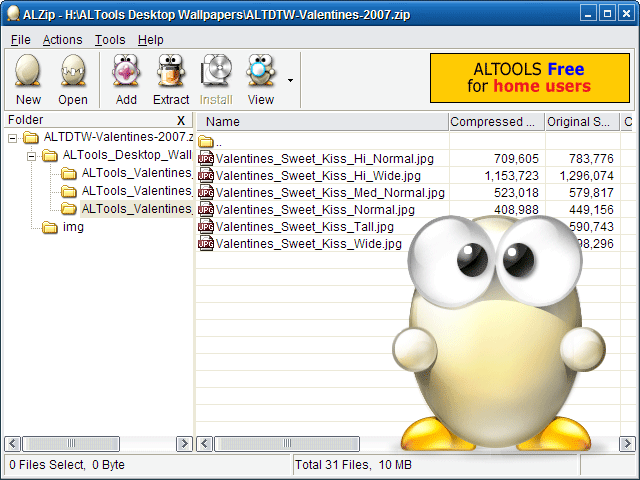
Try ALZip and see for yourself:
- 100% Fully Functional
- 36 archive and compression file formats (more than 36 file extensions)
- Open CD burning file formats: ISO and BIN
- Open virtual CD files: LCD
- Password Recovery
- Create SFX (exe)
- Create comprehensive archives over 2600 volumes
- Unlimited archive size with ALZ
- More information ...
- 100% Fully Functional
- 36 archive and compression file formats (more than 36 file extensions)
- Open CD burning file formats: ISO and BIN
- Open virtual CD files: LCD
- Password Recovery
- Create SFX (exe)
- Create comprehensive archives over 2600 volumes
- Unlimited archive size with ALZ
- More information ...
00:18 | 0
Comments | Read More
Xilisoft Video Converter Platinum 5.1.26.1231
 Xilisoft Video Converter Platinum 5.1.26.1231
Incredibly easy to use, for beginners and pros alike, Xilisoft Video Converter all abilities to give you a product with excellent quality: convert videos from all common formats such as AVI, MPEG, WMV, DivX, MP4, H.264/AVC, AVCHD , MKV, RM, MOV, XviD, 3GP, etc., convert between MP3, WMA, WAV, RA, M4A, AAC, AC3, OGG audio, and create amazing videos from pictures. The luxuriously optimized profiles of this video converter if it be possible to watch movies and listen to music on PSP, PS3, iPod, iPhone, Apple TV, Xbox and other digital devices.
Input File Format Support:
Video: AVI, MPEG, WMV, MP4, FLV, MKV, H.264/MPEG-4, DivX, XviD, MOV, RM, RMVB, M4V, VOB, ASF, 3GP, 3G2, SWF, H.261, H. 264, DV, DIF, MJPG, MJPEG, DVR-MS, NUT, QT, YUV, DAT, MPV, NSV
AVCHD video (*. mts, *. m2ts), H.264/MPEG-4 AVC (*. mp4), MPEG2 HD Video (*. mpg, *. mpeg), MPEG-4 HD-Video-TS (* . ts), MPEG-2 TS HD Video (*. ts), Quick Time HD Video (*. mov), WMV HD Video (*. xwmv), Audio-Video Interleaved HD Video (*. avi)
Audio: MP3, WMA, AAC, WAV, CDA, OGG, FLAC, APE, CUE, M4A, RA, RAM, AC3, MP2, AIFF, AU, MPA, SUN AU format
Image: BMP, GIF, JPEG, PNG
Output File Format Support:
Video: AVI, MPEG, WMV, MP4, FLV, H.264/MPEG-4, DivX, XviD, MOV, RMVB, ASF, 3GP, 3G2, SWF, VOB, TS, DV
H.264/MPEG-4 AVC (*. mp4), MPEG2 HD Video (*. mpg, *. mpeg), MPEG-4 HD-Video-TS (*. ts), MPEG-2 TS HD Video (*. ts), Quick Time HD Video (*. mov), WMV HD Video (*. wmv), Audio-Video Interleaved HD Video (*. avi)
Audio: MP3, WMA, AAC, WAV, OGG, APE, FLAC, M4A, RA, AC3, MP2, AIFF, AMR, SUN AU format
Image: BMP, GIF, JPEG, PNG
Input File Format Support:
Video: AVI, MPEG, WMV, MP4, FLV, MKV, H.264/MPEG-4, DivX, XviD, MOV, RM, RMVB, M4V, VOB, ASF, 3GP, 3G2, SWF, H.261, H. 264, DV, DIF, MJPG, MJPEG, DVR-MS, NUT, QT, YUV, DAT, MPV, NSV
AVCHD video (*. mts, *. m2ts), H.264/MPEG-4 AVC (*. mp4), MPEG2 HD Video (*. mpg, *. mpeg), MPEG-4 HD-Video-TS (* . ts), MPEG-2 TS HD Video (*. ts), Quick Time HD Video (*. mov), WMV HD Video (*. xwmv), Audio-Video Interleaved HD Video (*. avi)
Audio: MP3, WMA, AAC, WAV, CDA, OGG, FLAC, APE, CUE, M4A, RA, RAM, AC3, MP2, AIFF, AU, MPA, SUN AU format
Image: BMP, GIF, JPEG, PNG
Output File Format Support:
Video: AVI, MPEG, WMV, MP4, FLV, H.264/MPEG-4, DivX, XviD, MOV, RMVB, ASF, 3GP, 3G2, SWF, VOB, TS, DV
H.264/MPEG-4 AVC (*. mp4), MPEG2 HD Video (*. mpg, *. mpeg), MPEG-4 HD-Video-TS (*. ts), MPEG-2 TS HD Video (*. ts), Quick Time HD Video (*. mov), WMV HD Video (*. wmv), Audio-Video Interleaved HD Video (*. avi)
Audio: MP3, WMA, AAC, WAV, OGG, APE, FLAC, M4A, RA, AC3, MP2, AIFF, AMR, SUN AU format
Image: BMP, GIF, JPEG, PNG
00:10 | 0
Comments | Read More
Memory Improve Ultimate 5.2.1.150
Written By ISLAM ZAIN on 4 Jan 2010 | 09:57
Memory Improve Ultimate 5.2.1.150

Memory Improve Ultimate is a powerful memory optimizer monitoring software to improve memory and Windows. It can automatically compress and free wasted RAM memory to processes run faster and with greater stability. It has the ability to still see and monitor data of RAM memory, paging file usage and CPU usage in real time. It is a feature-rich yet easy to use program.
Memory Improve Ultimate designs recommend a button for new users easy to use. In addition, Memory Improve Ultimate can easily both beginners and experienced users to be used.
Here are some key features of "Ultimate Memory Improve"
· Free memory automatically
· Defrag parameters in the background
· Monitor system and automatically optimize if they need without interrupting your work
· Display memory in real time
· Showroom occupied the swap file
Top Place priority of CPU allocation automatically
· User's habit of always learning
· Analyze and identify the most frequently used programs
· Stop processes and programs or to reclaim memory occupied by listed processes
http://depositfiles.com/files/ipd8ubp84
Memory Improve Ultimate designs recommend a button for new users easy to use. In addition, Memory Improve Ultimate can easily both beginners and experienced users to be used.
Here are some key features of "Ultimate Memory Improve"
· Free memory automatically
· Defrag parameters in the background
· Monitor system and automatically optimize if they need without interrupting your work
· Display memory in real time
· Showroom occupied the swap file
Top Place priority of CPU allocation automatically
· User's habit of always learning
· Analyze and identify the most frequently used programs
· Stop processes and programs or to reclaim memory occupied by listed processes
http://depositfiles.com/files/ipd8ubp84
09:57 | 0
Comments | Read More
Ashampoo Software Collection Multilanguage
Written By ISLAM ZAIN on 3 Jan 2010 | 18:33
Ashampoo Software Collection Multilanguage (Update 1.1.2010 )-Inkl. Serial´s + Keymaker

The collection of the series of programs intended for reception of Ashampoo CD / DVD from
Hard Drives, creations include DVD menu and customs of other purposes. With this detailed
Program list, applications, and templates can be in the detailed description to acquaint.
Programs Included:
1. Ashampoo Burning Studio
2. Ashampoo ClipFinder HD
3. Ashampoo Core Tuner
4. Ashampoo FireWall
5. Ashampoo HDD Control
6. Ashampoo Internet Accelerator
7. Ashampoo Magical Defrag
8. Ashampoo Movie Shrink & Burn
9. Ashampoo Office 2010
10. Ashampoo Photo Commander
11. Ashampoo Photo Optimizer
12. Ashampoo PowerUp
13. Ashampoo UnInstaller
14. Ashampoo UnInstaller Platinum
15. Ashampoo WinOptimizer
16. Ashampoo Burning Studio 9 Theme Pack
17. Ashampoo Slideshow Studio HD
Pictures
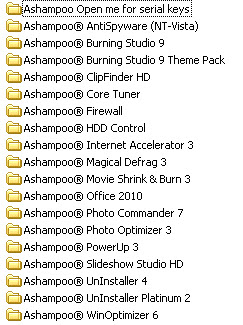
With new Keymaker for 51 Ashampoo-Programme
Ashampoo Software Collection Multilanguage ( Update 1.1.2010)-Inkl. Serial´s+ New Keymaker
Download DLC Container
Download DLC Container
18:33 | 0
Comments | Read More
All Video and Audio Softwares download

1.Flash Player
2.Mpeg converter
3.Real Alternative
4.Total Video Player 1.03
5.Total.Video.Converter.3.0.1
6.Ultra ISO 9
7.Video Convert Master 8
8.Winamp
12:53 | 0
Comments | Read More
Portable Aero SWF Max Flash Player 1.6.868
Portable Aero SWF Max Flash Player 1.6.868

Portable Aero SWF Max Flash Player 1.6.868 ML | Work in Windows XP, Vista, Windows 7 32 \ 64 | 7 MB
SWF.max Player Flash | Advanced Flash movie player for Windows
Have fun watching SWF movies
Features:
- Play Flash movies, Flash games and playing, as these were ordinary videos.
- Browse and organize your Flash movies with a built-in media browser. Thumbnails easier.
- Create and save Flash Playlists.
- Playing or showing of Flash movies in full screen mode.
- Play any type of flash file types like Flash (SWF), Flash Projector (EXE) and Flash Video (FLV).
- Set your Flash movies as screen savers or interactive animated wallpaper.
- Convert Flash movies to Flash Projectors and vice versa. Projectors are designed smaller than normal ones!
- Create thumbnails for your web site using Flash Thumbnail Generator.
- Automate tasks using Command Line scripting
Media Browser
Browse your Flash movies with a SWF.max Media Browser. Thumbnails make it easy to find, the Flash file, you would open it. Files by size, date or type, to make it even easier. Movies move, copy, delete or rename them with a few mouse clicks.
Playback Control
Control Flash Movies (SWF) and Flash video (FLV) as normal videos. Set play, pause, volume, or mute, set the playback position and view movie playback time. You can do this either via on-screen controls or the mouse or keyboard shortcuts. How Wheel Mouse Double-click on pause, or click-wheel mouse to go "full screen". Special Media Keys on your new keyboard instruments will work.
Playback or convert Projectors
SWF.max playing and browsing of Flash movies (SWF), Flash Video (FLV) and Flash projectors (EXE) the same way. Convert Flash projectors to view Flash movies or vice versa. Projectors with SWF.max created are smaller than normal projectors.
Playback in full screen mode
Just double-click with your mouse wheel or press Ctrl + F to have maximum fun watching flash files full screen. Flash Movie covers entire screen area and still have "full rights" for playback. Move the mouse to the proper screen edge and Voila! - You get playback controls, SWF.max menu or playlist appears.
Create and manage playlists
Drop a few flash movies or a folder to create a playlist and watch them. Yo can open and save the playlists. Playlists can be played in different Repat and shuffle mode.
Create Flash Screensavers
Turn to any Flash movie, or video projector in your personal screen saver with a few mouse clicks. This feature is also available as a separate product called SWF.max Flash Screensaver.
SWF.max Player Flash | Advanced Flash movie player for Windows
Have fun watching SWF movies
Features:
- Play Flash movies, Flash games and playing, as these were ordinary videos.
- Browse and organize your Flash movies with a built-in media browser. Thumbnails easier.
- Create and save Flash Playlists.
- Playing or showing of Flash movies in full screen mode.
- Play any type of flash file types like Flash (SWF), Flash Projector (EXE) and Flash Video (FLV).
- Set your Flash movies as screen savers or interactive animated wallpaper.
- Convert Flash movies to Flash Projectors and vice versa. Projectors are designed smaller than normal ones!
- Create thumbnails for your web site using Flash Thumbnail Generator.
- Automate tasks using Command Line scripting
Media Browser
Browse your Flash movies with a SWF.max Media Browser. Thumbnails make it easy to find, the Flash file, you would open it. Files by size, date or type, to make it even easier. Movies move, copy, delete or rename them with a few mouse clicks.
Playback Control
Control Flash Movies (SWF) and Flash video (FLV) as normal videos. Set play, pause, volume, or mute, set the playback position and view movie playback time. You can do this either via on-screen controls or the mouse or keyboard shortcuts. How Wheel Mouse Double-click on pause, or click-wheel mouse to go "full screen". Special Media Keys on your new keyboard instruments will work.
Playback or convert Projectors
SWF.max playing and browsing of Flash movies (SWF), Flash Video (FLV) and Flash projectors (EXE) the same way. Convert Flash projectors to view Flash movies or vice versa. Projectors with SWF.max created are smaller than normal projectors.
Playback in full screen mode
Just double-click with your mouse wheel or press Ctrl + F to have maximum fun watching flash files full screen. Flash Movie covers entire screen area and still have "full rights" for playback. Move the mouse to the proper screen edge and Voila! - You get playback controls, SWF.max menu or playlist appears.
Create and manage playlists
Drop a few flash movies or a folder to create a playlist and watch them. Yo can open and save the playlists. Playlists can be played in different Repat and shuffle mode.
Create Flash Screensavers
Turn to any Flash movie, or video projector in your personal screen saver with a few mouse clicks. This feature is also available as a separate product called SWF.max Flash Screensaver.
12:37 | 0
Comments | Read More
Subscribe to:
Posts (Atom)


