islam Zain | Voice Over

Fans

Google-Translate-English to French Google-Traduction-Français-en-espagnol  Google-Traduction-Français-en-allemand  Google-Traduction-Français-en-italien  Google-Traduction-Français-en-allemand BETA Google-Translate-Chinese (Simplifié) BETA Google-Traduction-Français-en-japonais  Google-Traduction-Français-en-coréen BETA
Traduit par +free downloadObtenir ce Widget

search


AddThis

Welcome Guys

Showing posts with label Security. Show all posts

How to Remove MS Removal Tool

Written By ISLAM ZAIN on 31 Mar 2011 | 12:04

MS Removal Tool is a rogue security application that comes up with tons of infections and security threats to make you think that your computer is infected with malicious software. This scareware may report up to 30 infections on your computer which do not even exist. Besides, the scan is a little too fast to be real. It charges about $60 to remove the threats and even claims that your PC will be protected against other malware if you choose to purchase the full version of MS Removal Tool. Of course, you shouldn't pay for this rogue AV. By the way, do not confuse this fake application with the Microsoft Windows Malicious Software Removal Tool which is a perfectly legitimate tool. Cyber-criminals clearly want to gain some credibility with well known names here.
12:04 | 0 Comments | Read More

AVG Free Edition 2011 Build 1204a3403

Written By ISLAM ZAIN on 17 Mar 2011 | 21:41

All our downloads run on dedicated windows hosting servers. We host on these dedicated servers to allow your downloads to be as fast as

Download AVG Free Edition 2011 Build 1204a3403

21:41 | 0 Comments | Read More

Remove Trojan.Ransomware

Written By ISLAM ZAIN on 14 Mar 2011 | 21:19

Trojan.Ransomware is a piece of malware that hijacks your computer and demands payment in exchange for the unlock key. If you don't have the key, you can't do anything. Very often, ransomware locks Windows in Safe Mode and Safe Mode with Networking too; otherwise you could easily get rid of it. However, there are a couple of steps that you can generally follow to get rid of the majority of Trojan.Ransomware type infections.

A few days ago we ended up with a specific Trojan.Ransomware that targets Russian web users. It hijacks the computer and displays a message in Russian saying that you need to send and an SMS on given number to retrieve the activation code.


21:19 | 0 Comments | Read More

Remove -You have committed network crime! -Ransomware

"You have committed network crime!" is a fake warning (ransomware) which states that you were watching materials with pornographic content or downloading unlicensed software, movies and music. This ransomware also states that all the examples found on your computer will be serving as material evidence in a court. You have 24 hours to call and get a unlock code so that unlicensed software and pornographic content will be deleted.
21:17 | 0 Comments | Read More

How to Remove AntiMalware GO-Uninstall Guide 2011

AntiMalware GO is a rogue anti-virus application that hijacks your computer, displays misleading security alerts and reports non-existent infections in an effort to frighten you into purchasing worthless security software. This rogue application offers a false sense of security because it can not protect your computer against any type of malware. AntiMalware GO reported more than 20 false malware related security threats (mostly spyware, trojans and adware) on our test machine. This rogue AV it is installed via annoying pop-up ads, fake online scanners and infected websites. It is possible to get this rogue security software by simply visiting a website, even a reputable one. If AntiMalware Go has infected your computer, you should remove it immediately. Thankfully, we've got the removal instructions to help you to remove AntiMalware GO and associated malware for free. Please follow the steps in the removal guide below.
21:13 | 0 Comments | Read More

NOD32 AntiVirus 4.2.71 download free NOD32 AntiVirus version 4.2.71

Written By ISLAM ZAIN on 8 Feb 2011 | 18:00

NOD32 AntiVirus 4.2.71NOD32 ,AntiVirus 4.2.71, download NOD32, AntiVirus 4.2.71

NOD32 AntiVirus version 4.2.71is the most effective protection you can find to combat today's huge volumes of Internet and email threats. It provides comprehensive antivirus and antispyware protection without affecting your computer's performance.
18:00 | 0 Comments | Read More

Anti Trojan Elite V5.2.8

Written By ISLAM ZAIN on 5 Jan 2011 | 16:17

Anti Trojan Elite (ATE) ist ein Malware-Entferner, kann es zu erkennen und saubere Malware in Festplatte oder memory.Anti Trojan Elite bietet eine Echtzeit-Malware Firewall für den Benutzer, sobald ein Trojaner oder Keylogger würde geladen wurde, kann der ATE zu erkennen, Block und reinigen Sie es in der Zeit, bevor es beginnt. Die ATE können mehr als 22.000 Trojaner, Würmer und Keylogger erkennen derzeit, und die Zahl der Malware-ATE könnte sauberer wächst sehr schnell, wir sammeln ganzen Welt Malware, können Benutzer über unsere automatische Live-Update Funktion, um die Macht, diese sauber zu erhalten neue Malware in der Zeit.
WÄHLEN SIE DIE GRÜNDE Anti Trojan Elite
- Echtzeit-Malware Firewall schützt den Computer des Benutzers in Echtzeit.
- Erkennen und Entfernen von Malware binded, tut nicht weh, normale Datei und reinigen Sie die Malware.
- Erkennen und Entfernen von Malware kein Prozess, einige Malware nicht über eine EXE-Datei, sind nur einige der DLL-Dateien und läuft wie einige Threads in anderen Verfahren, kann ATE ermittelt und säubert diese Art von Malware, auch er läuft.
- Gratis-Tools. Sehen Sie sich die Informationen von TCP / IP Zustände und Prozesse Informationen.
16:17 | 0 Comments | Read More

Norton Internet Security 2011 Reviewing

type='html'>Today we welcome Norton Internet Security 2011 to the Security for Everyone series. When desktop security is considered, the Norton name is not far behind. With a history that dates back more than 25 years, and the claim of being the first antivirus program to perform automatic updates, this is easy to understand. Norton has not been without its problems though. Over time Norton became known not only for its utilities but also for the performance impact it had on systems. The previous review of Norton Internet Security 2010 found performance was not an issue and awarded the first "Buy for Grandma!" badge to Norton. In this review we'll see if Norton stays in Grandma's good graces.
First Impressions


A trial version of Norton Internet Security 2011 can be downloaded from the Norton site via this link. Unfortunately, as cited in the previous review, you will be required to provide credit card information before downloading the trial version. Your credit card will be charged at the end of the trial period if you do not cancel the service. This is simply a poor practice on the part of Norton. I imagine the revenue generated as a result of people that do not cancel their trial is significant enough for them to continue this shadowy tactic. Unfortunate. Thankfully, you can choose to download from sources such as SoftPedia and CNET, without having to provide such information.

Once you download Norton Internet Security 2011 you'll find the install very simple. The only customization option is to choose the install directory. If you don't choose to change the install directory this is really a one click install. Another member of the 7 Tutorials team recently upgraded their 2010 version and found the upgrade as simple as the fresh install. With the upgrade only a single reboot was required and the settings of the uninstalled 2010 version were imported into the 2011 upgrade.

Upon completion of a fresh install you are met with a relatively clean, modern looking interface. An initial update is performed within a few minutes and the scanning is set to run when the system is idle. The latter makes a scheduled scan unnecessary.

Norton Internet Security 2011

A review of Windows security settings and services finds Norton does end the Windows Firewall and Windows Defender applications. I was also pleased to find I could not end the Norton services nor could I cancel the running process. I also reviewed the initial performance impact and found surprisingly little, even while running an initial scan. The team at av-comparatives.org found similar results when they awarded Symantec, Norton's parent company, the Advanced+ rating in the August 2010 Performance test.

Aside from the download process itself, my impression of Norton Internet Security 2011 is positive. The proper system maintenance is performed and the initial interface, while a bit distracting with the worldwide cybercrime activity map, is not intimidating.
Ease of Use and Configuration

The main interface displays a system status in the header of the application. This is followed by links to access settings, performance and a variety of support related links. Within a section titled 'Computer Protection' you'll find a link to perform a scan, access history, manage the quarantine, view application ratings and see when LiveUpdate last performed an update.

Norton Internet Security 2011

The right side of the interface is dedicated to displaying the status of the various security services. The status is indicated by an orange (on) or red (off) toggle switch. This is a good use of real estate and serves as a nice dashboard of enabled services. When you choose to turn off a service Norton displays a prompt warning of the effects of doing so and provides a drop down list where you can choose the duration of time the service should be left off. This is a nice measure which encourages the continued protection of your system.

Norton Internet Security 2011

If you're unsure of what function a service performs you can select the name of the service to see a short description.

Norton Internet Security 2011

Selecting the Settings link in the header will deliver you to the application settings. Here you will find all settings in a paneled or accordion style navigation system. Settings are broken into five categories: Computer Settings, Network Settings, Web Settings, Miscellaneous Settings and Parental controls.

Norton Internet Security 2011

Computer Settings are primarily used to define scan settings. These settings include the default action for specific types of threats, the level of heuristic protection and items to exclude from scans among many others. Firewall and Intrusion Prevention settings are found in the Network Settings category. Settings associated with the browser, antiphishing and malicious pages are found in the Web Settings category.

My initial thought was there are too many settings and they are too loosely defined. After thorough review I don't think the settings are too many and if a setting is confusing each sub category provides access to the help section via the question mark icon on the right side of the interface. It appears the default settings are adequate which should mean wandering into the settings won't be an immediate requirement.
Firewall

The Norton Internet Security 2011 Firewall provides several options for customization. The firewall settings are found within the Network Settings category of the main application settings. Most of the settings you might be interested in will be in the Smart Firewall section and include the ability to create and modify network rules via advanced settings, set Program Control and configure Trust Control.

Norton appears to do a fine job of identifying which programs are friendly and allows them access to the network. You can modify this list or add programs easily enough with a few clicks.

Norton Internet Security 2011

The Trust Control configuration is interesting as it allows you to choose the devices in your network that should be trusted. This will come in handy if you are the sort that has many network devices such as network storage or streaming media devices. Identifying them as trusted will eliminate many prompts.

When testing a firewall I like to throw a couple of intrusive scans at the device. This provides an opportunity to see just what kind of information is being returned to a would be attacker. Thankfully an intrusive against the Norton Internet Security 2011 firewall provided next to no information and nothing that might of value.

Norton Internet Security 2011

The default firewall configuration provides ample protection for the home user without being intrusive. Norton has done a good job of not requiring any extensive tweaking.
Antivirus and Antispyware Features

You will find the Antivirus and Antispyware settings within the Computer Setting category of the main application settings. The defaults here seem well suited to provide strong protection without being intrusive. Norton puts a lot of weight in their SONAR Protection feature which is built upon the significant strength of their user community. SONAR allows for the isolation of threats based on behavior even before a threat has been formally added to the database. With most threats originating online this is an important feature and one Norton has done well to develop.

Norton Internet Security 2011

A nice feature of the Norton scanner is that it will actively scan your system when it is idle. This prevents the need to bother with a scheduled scan, however it should be noted that while you can choose to schedule a scan doing so will disable the idle scanning.

In my own testing, the scanner responded without flaw and identified each threat. The previous review noted that Norton was less than agile when it came to adding new threats to their database. I did not find this to be the case in the 2011 version. Several of the threats I presented were less than ten days old, each identified and quarantined or removed accordingly. Possibly even more notable as a mark of improvement was my visit to a malicious site that had been identified for less than a day. My attempt to visit the site was blocked and the link included in the notification detailed the type of threat that might have been executed had I chosen to continue.

Norton Internet Security 2011

Norton has also received accolades from several independent testing site such as av-comparatives.org and avtest.org. Av-comparatives awared Norton Internet Security 2011 their hightest ranking of Advanced+ and avtest.org found that Norton passed their battery of tests as well. As was previously noted, Norton also fared very well in the av-comparatives performance test conducted in August 2010.

Norton's scanning engine is effective and light on resources. The depth of the database is an asset in this age when numerous new threat strains are identified each day. The idle scanning default and strength of the SONAR feature round out a solid scanning solution.
14:23 | 0 Comments | Read More

G Data Internet Security 2011 Reviewing

type='html'>In this episode we will look at G Data Internet Security 2011 in the Security for Everyone series. G Data has been focused on security solutions for quite some time, as evidenced by their recent 25 year anniversary. In the previous review, G Data Internet Security 2010 earned the "Buy for Grandma" badge. Let us see if this verdict is still applicable for their 2011 version.
First Impressions

You can download a trial version of G Data Internet Security 2011 easily enough and they don't require any personal information. What is required though is a bit of patience. G Data Internet Security 2011 is large, huge in fact. The download comes in near 300 MB and is clearly the largest of any solution I've reviewed thus far.

G Data sports a pretty basic installation wizard but does allow for some customization. You can choose to install the full version or a fully functional 30 day trial version. By default the Antivirus, Antispam and Firewall modules are installed. Additional modules (disabled by default) include the Shredder and Parental controls. This review has been done using the default configuration.

G-Data Internet Security 2011

Moving through the installation you'll find G Data is set to check for updates hourly and to perform a computer scan weekly. A single reboot is required before G Data is set to protect your system. The problems for me began after the reboot.

G Data does end the Windows Firewall service but does not end the Windows Defender service. The latter you will need to do yourself, assistance can be found here. G Data attempted an initial update but requires registration before an update can be performed. The registration form is simple enough allowing for a fast or full login. I was not thrilled that a checkbox is selected by default which appears to opt you in to receive junk mail from any number of sources.

G-Data Internet Security 2011

Unfortunately, once I submitted the form I was met with a message noting the product had already been registered and has expired or would expire soon. If you cannot register you cannot receive updates. It's as simple as that. Obviously this is a problem.
G-Data Internet Security 2011


I keep my test system ready for complete recovery and thought there may be something wrong on my end that caused this registration issue. I performed a complete system recovery and after applying the current Windows updates moved through downloading and installing G Data Internet Security 2011 again. I encountered the same problem. My next course of action was to visit the G Data site and review the FAQ (Frequently Asked Questions) area of their support site. Further disappointment was encountered here as a search turned up nothing helpful and the list of applications to narrow a search on does not even include the latest products, nor did it include any version for the past several years. I was confused.

G-Data Internet Security 2011


Having no success on the support site I decided to contact G Data support via email. After several days I received a response which basically said they had no record of my email as a registered user and could I access the update options and let them know the registered name. Of course there is no name because I haven't been able to register. I shared this information, along with screenshots, in a response. This last message has yet to see a reply.

G Data does indeed check for an update every hour as scheduled and subsequently failed each hour as well.

Sure, there is a chance they placed a faulty trial version on their site and maybe their registration process was broken too, and maybe they were updating their FAQ's when I was looking for help. All of these may be forgivable for a startup or beta application but for one that has been in business for 25 years?

Needless to say, my initial impression is not very good.
Ease of Use and Configuration

Working with G Data Internet Security 2011 is not too difficult. The interfaces presented are largely minimalist in design and the options are few and pretty straightforward. The main interface provides all the pertinent stats around when a scan was last performed, the last time an update was done and whether or not the various protection modules (firewall, virus monitoring etc) are enabled. The More functions link within the Virus check section allows easy access to different types of scans as well as a link to access the quarantine.

G-Data Internet Security 2011

You will find options associated with virus scanning, update processing and Internet and Email protection. The Virus checkoptions host the typical settings such as what the default clean action should be and how to treat infected archive files. There is also the option to have G Data pause scanning activities if the system load is high. G Data utilizes two scanning engines, both engines are enabled by default which is the recommended and default configuration. You do have the option to only use one engine if you like. I imagine performance concerns may be the only good reason to choose single engine scanning.

G-Data Internet Security 2011

The Monitor tab of the virus options is where you will find advanced settings. These settings are largely in the form of turning on or off features via a checkbox and include items like heuristic scanning, checking system areas during start and, among others, checking for spyware.

Within the Update section you'll find options for scheduling updates or forcing a manual program update. In the image below you'll notice the UAC icon present next to the update link. This means elevated privileges are required to perform an update. This isn't a good thing since it requires administrative access of the user trying to perform the function. If the user doesn't have administrative access the update cannot be performed. Unfortunately a UAC prompt is issued for most major actions, including a system scan. I'll discuss this more in the Antivirus section.

G-Data Internet Security 2011

The firewall configuration is non-intimidating and allows for management of the usual settings. Here you change how a network is defined (trusted or not) and define rules to allow and deny applications and ports. There is also a convenient space for you to identify exceptions in the form of a whitelist of sites that should be allowed. Unfortunately even this function forces a UAC prompt.

G-Data Internet Security 2011

Accessing the more advanced settings within the firewall requires you to select the Edit link from the Firewall settings status pane. This isn't exactly intuitive but is at least found on the main setting interface. G Data is configured to run in autopilot mode by default which restricts your access to the advanced features unless you choose the Custom Security (for professionals) option. With this option selected you can set options around the type of attacks to detect, edit settings related to creating rules, how the system should respond to unknown server applications and whether or not you should be notified when connecting to new networks if you are unprotected.

G-Data Internet Security 2011

While G Data Internet Security 2011 is not difficult to use or configure, the number of actions that require elevated privileges is surprising. No other security application reviewed, with the exception of the 64-bit version of BullGuard Internet Security 9.0, presented this barrier to security.
Firewall

The G Data firewall is as unobtrusive as any I've tested thus far. I've been testing for more than a week and not one prompt has been issued (aside from forced scans) nor have any applications been blocked. This speaks pretty well of the default auto-pilot configuration. The Firewall settings are minimal but sufficient and allow you to define rules for allowing or blocking ports and applications. This will satisfy most novice users but may fall short of what a user experienced in managing security setting would expect.

G-Data Internet Security 2011

In my testing of the firewall I like to perform an intrusive scan from a couple of different sources, namely Nessus and Nmap. When my test system was scanned G Data immediately identified that a scan was underway and displayed a notification along with a link to some information about the system performing the scan. The latter is a nice feature to help identify the attacker right away and is something a bit unique to G Data. This information may be available in most other suites but you will likely have to look into the security logs to find the offending machine.

G-Data Internet Security 2011

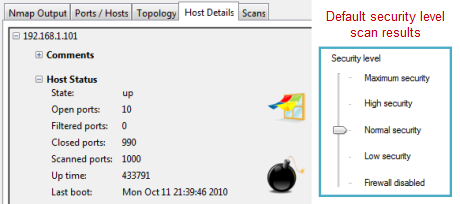
Despite G Data doing a fine job of identifying the scan, the firewall did not perform exceptionally well at limiting the amount of information the scan was able to collect. Nmap identified the system as being vulnerable based on more than 9 ports found to be open. The netbios information derived was also more than I was comfortable with. I rescanned the system after changing the firewall settings from Normal Security to High Security and the results improved by significantly reducing the number of open ports.

G-Data Internet Security 2011

There is a default setting within the firewall that will notify you if you are connecting to an unprotected network. Regardless of which network I connected to I could not get this prompt to display. I consider this prompt essential to good security especially considering the poor scan results with the default configuration. If the prompt were to display, you would then be reminded to adjust the security level manually which is far better than simply having to remember to do it.

G-Data Internet Security 2011

The firewall does a nice job of not getting in your way which is a fine characteristic. Unfortunately the default protection could be better. At the very least some minor changes could be made to the interface that would place the user in a position to change the security level in certain instances, such as connecting to a new or unidentified network.
Antivirus and Antispyware features

When it comes to antivirus and antispyware detection G Data Internet Security 2011 shines. I threw several infected files at the test system and each were identified quickly and without issue. The default action upon detecting a threat is to disinfect the file, if possible, or quarantine, if disinfection is not possible. This can be changed easily within the settings, if your preference is to be prompted for the action to take.

G-Data Internet Security 2011

As mentioned previously, the real downside with the antivirus and antispyware feature is the fact that you have to answer a UAC prompt whenever a scan is initialized. This is true of a scheduled scan as well. This is very unfortunate since it means a scan could never be performed if the user initiating it does not have administrative access. Ultimately this implementation results in a less secure system regardless of how good the detection engines are. Thankfully the real-time protection does not appear to suffer and performs as one might hope.

Presumably the detection of threats in the browser also works well however, I was not able to force a prompt to display. This can be difficult to test as many malicious sites are closed shortly after being detected. It may also have to do with the difficulties I encountered with registration issues which kept the application from updating beyond the April 2010 definitions the trial version was equipped with.

Thankfully you don't need to rely on my testing alone. The team behind av-comparitives.org awarded G Data the Advanced+ (best) rating in their testing of Internet Security 2011.

The antivirus setting are easy to adjust and just as easy to understand. They also have proven to be very effective. Unfortunately the nagging UAC issue keeps it from being as effective as it could be.
14:22 | 0 Comments | Read More

Avast! Free / Professional / Internet Security 5.1.864 download

Written By ISLAM ZAIN on 4 Jan 2011 | 18:26


Download Avast! Free Antivirus 5.1.864

Avast! Free Antivirus 5.1.864

Avast Software - 55.29MB (Non-Commercial Freeware)

18:26 | 0 Comments | Read More

download AVG Free Edition 10.0.1188 32-bit

Written By ISLAM ZAIN on 17 Dec 2010 | 00:09


Download AVG Free Edition 10.0.1188 (32-bit)

AVG Free Edition 10.0.1188 (32-bit)

AVG Technologies - 145.81MB (Freeware)
avg,download,free edition

00:09 | 0 Comments | Read More

Internet Threat Meter

Written By ISLAM ZAIN on 14 Oct 2010 | 22:43


Every day, it seems, new threats hit the Internet. Symantec's Internet Threat Meter keeps you informed about the latest arrivals and includes a link to a Symantec site where you can get more information and find fixes. The program runs as a nifty little widget in Windows XP, or as a Sidebar Gadget in Windows Vista and 7, gathering data about the latest threats and reporting the results to you.


download info


you can download in this link:                                                                           link
22:43 | 0 Comments | Read More

McAfee SiteAdvisor

On the Web, unlike in the real world, it can be hard to recognize a bad neighborhood when you're wandering around in it. There are no boarded-up windows, no empty storefronts, no hard-looking men lounging on corners or in doorways. In fact, the prettiest and most inviting Web site may harbor all kinds of malware. That's where the McAfee SiteAdvisor comes in. It warns you when a Web site that you're about to visit--or are already visiting--may be dangerous. You install it as an Internet Explorer toolbar or as a Firefox plug-in. Then when you search with Google or some other search engine, it displays color-coded icons next to each search result, indicating whether the site in question is safe (green), questionable (yellow), or clearly unsafe (red). It checks sites for downloads that may be dangerous, and for evidence that they will send you spam if you give them your e-mail address. The toolbar offers similar reports about the sites you're currently visiting.


download info


you can download in this link:                                                                           link
22:42 | 0 Comments | Read More

AVG Anti-Rootkit rootkit-malicious software


One of the most feared types of malware is the rootkit--malicious software that many types of antimalware can't detect. Not uncommonly, bad guys use rootkits to hide Trojan horses, which can then be used to take over your PC without your knowledge. AVG Anti-Rootkit's sole purpose is to find and kill rootkits. Run it and it scans your PC,

sniffing rootkits out and removing any it finds. Note that this utility doesn't work with Windows Vista & windows 7 

download info


you can download in this link:                                                                           link
22:38 | 0 Comments | Read More

Autoruns 10.04

Written By ISLAM ZAIN on 13 Oct 2010 | 16:27


Autoruns 10.04


Autoruns 10.04
Autoruns shows you what programs are configured to run during system bootup or login, and shows you the entries in the order Windows processes them. These programs include ones in your startup folder, Run, RunOnce, and other Registry keys. You can configure Autoruns to show other locations, including Explorer shell extensions, toolbars, browser helper objects, Winlogon notifications, auto-start services, and much more. Autoruns goes way beyond the MSConfig utility bundled with Windows Me and XP.

Autoruns' Hide Signed Microsoft Entries option helps you to zoom in on third-party auto-starting images that have been added to your system and it has support for looking at the auto-starting images configured for other accounts configured on a system. Also included in the download package is a command-line equivalent that can output in CSV format, Autorunsc.

This download includes the exe and command line versions of Autoruns.


Title: Autoruns 10.04
Filename: Autoruns.zip
File size: 605KB (619,635 bytes)
Requirements: Windows 2000 / XP / 2003 / Vista / Windows7 / XP64 / Vista64 / Windows7 64
Languages: en-US
License: Freeware
Date added: October 7, 2010
Author: Microsoft SysInternals
www.microsoft.com/technet/sysinternals


download info

you can download in this link:                                                                           link
16:27 | 0 Comments | Read More

AVG Free Edition 10.0.1136

AVG Free Edition 10.0.1136 (32-Bit)


AVG Free Edition 10.0.1136 (32-bit)AVG Anti-Virus Free Edition is trusted antivirus and antispyware protection for Windows available to download for free. In addition, the new included LinkScanner® Active Surf-Shield checks web pages for threats at the only time that matters - when you're about to click that link.

AVG Anti-Virus Free has these following features:

* Award-winning antivirus and antispyware
* Real-time safe internet surfing and searching
* Quality proven by 80 million of users
* Easy to download, install and use
* Protection against viruses and spyware
* Compatible with Windows 7, Windows Vista and Windows XP

AVG Anti-Virus Free Edition is only available for single computer use for home and non commercial use.

This is the 32-bit version.


download info

you can download in this link:                                                                           link
16:23 | 0 Comments | Read More

]Windows Phone Security SnapSoft-ZX, Snapsoft-SE, Snapsoft-SMS, Snapsoft-IP


SnapSoft is the first embedded security application that combines multiple software solutions for protecting voice, text messages, direct file transfer, chat and email*. Snapsoft is designed for Smartphones and converged devices using Windows Mobile™ operating systems. SnapSoft can be downloaded to the device via a PC. Operation for security functions is made easy to use with a push of button.

Why take chances with your proprietary information? The Snapsoft encryption is based on government security standards established for AES algorithms, PKI and hashing protocols. Snapsoft is available in three versions including Snapsoft-ZX for touch screen phones using Windows Mobile Professional, Snapsoft-SE for non-touch screen phones using Windows Mobile Standard and Snapsoft-SMS for those who want to only send/recieve secure SMS. The Snapsoft-IP version will function over a 3G and Wi-Fi connection without the need for a CSD connection. Please note that if you wish to purchase the IP version you will need to also purchase: 1) Enterprise Server License or 2) Use our Managed Service (monthly fee). For additional details feel free to contact us. The Managed Service is intended for small businesses or individual users who do not


The IP version of the software is will connect through the following connecitons: UMTS, EDGE, EVDO and Wi-Fi. The Legacy version will connect over traditional 2G networks using CSD. Users that are looking to use the Legacy networks with Circuit Switch Data (CSD) can purchase the secure phones without the need for SecureLine services.

If would like additional information about CSD connectivity a link is provide to an external website that is compiling a list of countries with GSM operators that offer CSD. Global Teck Worldwide also maintains a complete list of CSD (circuit switch data) availability. Technical and engineering data about CSD is available in our CSD White Paper . CSD service is not required for using the Snapsoft SMS. It will use the GPRS/EDGE/UMTS connection for delivery of the text messages just as if you were sending regular text messages.


15:30 | 0 Comments | Read More

Emsisoft Anti-Malware 5.0.0.68

Written By ISLAM ZAIN on 11 Aug 2010 | 22:32


Download 
Emsisoft Anti-Malware 5.0.0.68Emsisoft Anti-Malware 5.0.0.68

 Emsisoft Anti-Malware controleert alle actieve programma's in real time voor gevaarlijk gedrag (Behavior Blocking) en kan detecteren nieuwe, onbekende Trojans, wormen, virussen en andere schadelijke programma's (Zero-Day gevaren) zonder dagelijkse updates. De handtekening-gebaseerde beveiliging (Emsisoft en Ikarus dubbele motor) zorgt voor een zeer hoog percentage erkenning van bekende malware zoals Trojaanse paarden, wormen en virussen.

Emsisoft Anti-Malware biedt een betrouwbare bescherming tegen:

    * Virussen, wormen, bots.
    * Trojaanse paarden, backdoors, keyloggers, rootkits.
    * Spyware, Adware, TrackingCookies..


you can download in this link:                                                                           link
22:32 | 0 Comments | Read More

Autoruns 10.02

Written By ISLAM ZAIN on 24 Jul 2010 | 02:06

Download Autoruns 10.02

Autoruns 10.02


Autoruns shows you what programs are configured to run during system bootup or login, and shows you the entries in the order Windows processes them. These programs include ones in your startup folder, Run, RunOnce, and other Registry keys. You can configure Autoruns to show other locations, including Explorer shell extensions, toolbars, browser helper objects, Winlogon notifications, auto-start services, and much more. Autoruns goes way beyond the MSConfig utility bundled with Windows Me and XP.
Autoruns' Hide Signed Microsoft Entries option helps you to zoom in on third-party auto-starting images that have been added to your system and it has support for looking at the auto-starting images configured for other accounts configured on a system. Also included in the download package is a command-line equivalent that can output in CSV format, Autorunsc.
This download includes the exe and command line versions of Autoruns.


02:06 | 0 Comments | Read More

AVG Free Edition 9.0.851


Download AVG Free Edition 9.0.851

AVG Free Edition 9.0.851


AVG Anti-Virus Free Edition is trusted antivirus and antispyware protection for Windows available to download for free. In addition, the new included LinkScanner® Active Surf-Shield checks web pages for threats at the only time that matters - when you're about to click that link.
AVG Anti-Virus Free has these following features:
  • Award-winning antivirus and antispyware
  • Real-time safe internet surfing and searching
  • Quality proven by 80 million of users
  • Easy to download, install and use
  • Protection against viruses and spyware
  • Compatible with Windows 7, Windows Vista and Windows XP
AVG Anti-Virus Free Edition is only available for single computer use for home and non commercial use.


01:54 | 0 Comments | Read More