islam Zain | Voice Over

Fans

Google-Translate-English to French Google-Traduction-Français-en-espagnol  Google-Traduction-Français-en-allemand  Google-Traduction-Français-en-italien  Google-Traduction-Français-en-allemand BETA Google-Translate-Chinese (Simplifié) BETA Google-Traduction-Français-en-japonais  Google-Traduction-Français-en-coréen BETA
Traduit par +free downloadObtenir ce Widget

search


AddThis

Welcome Guys

Norton Internet Security 2011 Reviewing

Written By ISLAM ZAIN on 5 Jan 2011 | 14:23

type='html'>Today we welcome Norton Internet Security 2011 to the Security for Everyone series. When desktop security is considered, the Norton name is not far behind. With a history that dates back more than 25 years, and the claim of being the first antivirus program to perform automatic updates, this is easy to understand. Norton has not been without its problems though. Over time Norton became known not only for its utilities but also for the performance impact it had on systems. The previous review of Norton Internet Security 2010 found performance was not an issue and awarded the first "Buy for Grandma!" badge to Norton. In this review we'll see if Norton stays in Grandma's good graces.
First Impressions


A trial version of Norton Internet Security 2011 can be downloaded from the Norton site via this link. Unfortunately, as cited in the previous review, you will be required to provide credit card information before downloading the trial version. Your credit card will be charged at the end of the trial period if you do not cancel the service. This is simply a poor practice on the part of Norton. I imagine the revenue generated as a result of people that do not cancel their trial is significant enough for them to continue this shadowy tactic. Unfortunate. Thankfully, you can choose to download from sources such as SoftPedia and CNET, without having to provide such information.

Once you download Norton Internet Security 2011 you'll find the install very simple. The only customization option is to choose the install directory. If you don't choose to change the install directory this is really a one click install. Another member of the 7 Tutorials team recently upgraded their 2010 version and found the upgrade as simple as the fresh install. With the upgrade only a single reboot was required and the settings of the uninstalled 2010 version were imported into the 2011 upgrade.

Upon completion of a fresh install you are met with a relatively clean, modern looking interface. An initial update is performed within a few minutes and the scanning is set to run when the system is idle. The latter makes a scheduled scan unnecessary.

Norton Internet Security 2011

A review of Windows security settings and services finds Norton does end the Windows Firewall and Windows Defender applications. I was also pleased to find I could not end the Norton services nor could I cancel the running process. I also reviewed the initial performance impact and found surprisingly little, even while running an initial scan. The team at av-comparatives.org found similar results when they awarded Symantec, Norton's parent company, the Advanced+ rating in the August 2010 Performance test.

Aside from the download process itself, my impression of Norton Internet Security 2011 is positive. The proper system maintenance is performed and the initial interface, while a bit distracting with the worldwide cybercrime activity map, is not intimidating.
Ease of Use and Configuration

The main interface displays a system status in the header of the application. This is followed by links to access settings, performance and a variety of support related links. Within a section titled 'Computer Protection' you'll find a link to perform a scan, access history, manage the quarantine, view application ratings and see when LiveUpdate last performed an update.

Norton Internet Security 2011

The right side of the interface is dedicated to displaying the status of the various security services. The status is indicated by an orange (on) or red (off) toggle switch. This is a good use of real estate and serves as a nice dashboard of enabled services. When you choose to turn off a service Norton displays a prompt warning of the effects of doing so and provides a drop down list where you can choose the duration of time the service should be left off. This is a nice measure which encourages the continued protection of your system.

Norton Internet Security 2011

If you're unsure of what function a service performs you can select the name of the service to see a short description.

Norton Internet Security 2011

Selecting the Settings link in the header will deliver you to the application settings. Here you will find all settings in a paneled or accordion style navigation system. Settings are broken into five categories: Computer Settings, Network Settings, Web Settings, Miscellaneous Settings and Parental controls.

Norton Internet Security 2011

Computer Settings are primarily used to define scan settings. These settings include the default action for specific types of threats, the level of heuristic protection and items to exclude from scans among many others. Firewall and Intrusion Prevention settings are found in the Network Settings category. Settings associated with the browser, antiphishing and malicious pages are found in the Web Settings category.

My initial thought was there are too many settings and they are too loosely defined. After thorough review I don't think the settings are too many and if a setting is confusing each sub category provides access to the help section via the question mark icon on the right side of the interface. It appears the default settings are adequate which should mean wandering into the settings won't be an immediate requirement.
Firewall

The Norton Internet Security 2011 Firewall provides several options for customization. The firewall settings are found within the Network Settings category of the main application settings. Most of the settings you might be interested in will be in the Smart Firewall section and include the ability to create and modify network rules via advanced settings, set Program Control and configure Trust Control.

Norton appears to do a fine job of identifying which programs are friendly and allows them access to the network. You can modify this list or add programs easily enough with a few clicks.

Norton Internet Security 2011

The Trust Control configuration is interesting as it allows you to choose the devices in your network that should be trusted. This will come in handy if you are the sort that has many network devices such as network storage or streaming media devices. Identifying them as trusted will eliminate many prompts.

When testing a firewall I like to throw a couple of intrusive scans at the device. This provides an opportunity to see just what kind of information is being returned to a would be attacker. Thankfully an intrusive against the Norton Internet Security 2011 firewall provided next to no information and nothing that might of value.

Norton Internet Security 2011

The default firewall configuration provides ample protection for the home user without being intrusive. Norton has done a good job of not requiring any extensive tweaking.
Antivirus and Antispyware Features

You will find the Antivirus and Antispyware settings within the Computer Setting category of the main application settings. The defaults here seem well suited to provide strong protection without being intrusive. Norton puts a lot of weight in their SONAR Protection feature which is built upon the significant strength of their user community. SONAR allows for the isolation of threats based on behavior even before a threat has been formally added to the database. With most threats originating online this is an important feature and one Norton has done well to develop.

Norton Internet Security 2011

A nice feature of the Norton scanner is that it will actively scan your system when it is idle. This prevents the need to bother with a scheduled scan, however it should be noted that while you can choose to schedule a scan doing so will disable the idle scanning.

In my own testing, the scanner responded without flaw and identified each threat. The previous review noted that Norton was less than agile when it came to adding new threats to their database. I did not find this to be the case in the 2011 version. Several of the threats I presented were less than ten days old, each identified and quarantined or removed accordingly. Possibly even more notable as a mark of improvement was my visit to a malicious site that had been identified for less than a day. My attempt to visit the site was blocked and the link included in the notification detailed the type of threat that might have been executed had I chosen to continue.

Norton Internet Security 2011

Norton has also received accolades from several independent testing site such as av-comparatives.org and avtest.org. Av-comparatives awared Norton Internet Security 2011 their hightest ranking of Advanced+ and avtest.org found that Norton passed their battery of tests as well. As was previously noted, Norton also fared very well in the av-comparatives performance test conducted in August 2010.

Norton's scanning engine is effective and light on resources. The depth of the database is an asset in this age when numerous new threat strains are identified each day. The idle scanning default and strength of the SONAR feature round out a solid scanning solution.
14:23 | 0 Comments | Read More

G Data Internet Security 2011 Reviewing

type='html'>In this episode we will look at G Data Internet Security 2011 in the Security for Everyone series. G Data has been focused on security solutions for quite some time, as evidenced by their recent 25 year anniversary. In the previous review, G Data Internet Security 2010 earned the "Buy for Grandma" badge. Let us see if this verdict is still applicable for their 2011 version.
First Impressions

You can download a trial version of G Data Internet Security 2011 easily enough and they don't require any personal information. What is required though is a bit of patience. G Data Internet Security 2011 is large, huge in fact. The download comes in near 300 MB and is clearly the largest of any solution I've reviewed thus far.

G Data sports a pretty basic installation wizard but does allow for some customization. You can choose to install the full version or a fully functional 30 day trial version. By default the Antivirus, Antispam and Firewall modules are installed. Additional modules (disabled by default) include the Shredder and Parental controls. This review has been done using the default configuration.

G-Data Internet Security 2011

Moving through the installation you'll find G Data is set to check for updates hourly and to perform a computer scan weekly. A single reboot is required before G Data is set to protect your system. The problems for me began after the reboot.

G Data does end the Windows Firewall service but does not end the Windows Defender service. The latter you will need to do yourself, assistance can be found here. G Data attempted an initial update but requires registration before an update can be performed. The registration form is simple enough allowing for a fast or full login. I was not thrilled that a checkbox is selected by default which appears to opt you in to receive junk mail from any number of sources.

G-Data Internet Security 2011

Unfortunately, once I submitted the form I was met with a message noting the product had already been registered and has expired or would expire soon. If you cannot register you cannot receive updates. It's as simple as that. Obviously this is a problem.
G-Data Internet Security 2011


I keep my test system ready for complete recovery and thought there may be something wrong on my end that caused this registration issue. I performed a complete system recovery and after applying the current Windows updates moved through downloading and installing G Data Internet Security 2011 again. I encountered the same problem. My next course of action was to visit the G Data site and review the FAQ (Frequently Asked Questions) area of their support site. Further disappointment was encountered here as a search turned up nothing helpful and the list of applications to narrow a search on does not even include the latest products, nor did it include any version for the past several years. I was confused.

G-Data Internet Security 2011


Having no success on the support site I decided to contact G Data support via email. After several days I received a response which basically said they had no record of my email as a registered user and could I access the update options and let them know the registered name. Of course there is no name because I haven't been able to register. I shared this information, along with screenshots, in a response. This last message has yet to see a reply.

G Data does indeed check for an update every hour as scheduled and subsequently failed each hour as well.

Sure, there is a chance they placed a faulty trial version on their site and maybe their registration process was broken too, and maybe they were updating their FAQ's when I was looking for help. All of these may be forgivable for a startup or beta application but for one that has been in business for 25 years?

Needless to say, my initial impression is not very good.
Ease of Use and Configuration

Working with G Data Internet Security 2011 is not too difficult. The interfaces presented are largely minimalist in design and the options are few and pretty straightforward. The main interface provides all the pertinent stats around when a scan was last performed, the last time an update was done and whether or not the various protection modules (firewall, virus monitoring etc) are enabled. The More functions link within the Virus check section allows easy access to different types of scans as well as a link to access the quarantine.

G-Data Internet Security 2011

You will find options associated with virus scanning, update processing and Internet and Email protection. The Virus checkoptions host the typical settings such as what the default clean action should be and how to treat infected archive files. There is also the option to have G Data pause scanning activities if the system load is high. G Data utilizes two scanning engines, both engines are enabled by default which is the recommended and default configuration. You do have the option to only use one engine if you like. I imagine performance concerns may be the only good reason to choose single engine scanning.

G-Data Internet Security 2011

The Monitor tab of the virus options is where you will find advanced settings. These settings are largely in the form of turning on or off features via a checkbox and include items like heuristic scanning, checking system areas during start and, among others, checking for spyware.

Within the Update section you'll find options for scheduling updates or forcing a manual program update. In the image below you'll notice the UAC icon present next to the update link. This means elevated privileges are required to perform an update. This isn't a good thing since it requires administrative access of the user trying to perform the function. If the user doesn't have administrative access the update cannot be performed. Unfortunately a UAC prompt is issued for most major actions, including a system scan. I'll discuss this more in the Antivirus section.

G-Data Internet Security 2011

The firewall configuration is non-intimidating and allows for management of the usual settings. Here you change how a network is defined (trusted or not) and define rules to allow and deny applications and ports. There is also a convenient space for you to identify exceptions in the form of a whitelist of sites that should be allowed. Unfortunately even this function forces a UAC prompt.

G-Data Internet Security 2011

Accessing the more advanced settings within the firewall requires you to select the Edit link from the Firewall settings status pane. This isn't exactly intuitive but is at least found on the main setting interface. G Data is configured to run in autopilot mode by default which restricts your access to the advanced features unless you choose the Custom Security (for professionals) option. With this option selected you can set options around the type of attacks to detect, edit settings related to creating rules, how the system should respond to unknown server applications and whether or not you should be notified when connecting to new networks if you are unprotected.

G-Data Internet Security 2011

While G Data Internet Security 2011 is not difficult to use or configure, the number of actions that require elevated privileges is surprising. No other security application reviewed, with the exception of the 64-bit version of BullGuard Internet Security 9.0, presented this barrier to security.
Firewall

The G Data firewall is as unobtrusive as any I've tested thus far. I've been testing for more than a week and not one prompt has been issued (aside from forced scans) nor have any applications been blocked. This speaks pretty well of the default auto-pilot configuration. The Firewall settings are minimal but sufficient and allow you to define rules for allowing or blocking ports and applications. This will satisfy most novice users but may fall short of what a user experienced in managing security setting would expect.

G-Data Internet Security 2011

In my testing of the firewall I like to perform an intrusive scan from a couple of different sources, namely Nessus and Nmap. When my test system was scanned G Data immediately identified that a scan was underway and displayed a notification along with a link to some information about the system performing the scan. The latter is a nice feature to help identify the attacker right away and is something a bit unique to G Data. This information may be available in most other suites but you will likely have to look into the security logs to find the offending machine.

G-Data Internet Security 2011

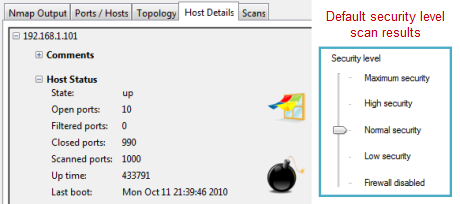
Despite G Data doing a fine job of identifying the scan, the firewall did not perform exceptionally well at limiting the amount of information the scan was able to collect. Nmap identified the system as being vulnerable based on more than 9 ports found to be open. The netbios information derived was also more than I was comfortable with. I rescanned the system after changing the firewall settings from Normal Security to High Security and the results improved by significantly reducing the number of open ports.

G-Data Internet Security 2011

There is a default setting within the firewall that will notify you if you are connecting to an unprotected network. Regardless of which network I connected to I could not get this prompt to display. I consider this prompt essential to good security especially considering the poor scan results with the default configuration. If the prompt were to display, you would then be reminded to adjust the security level manually which is far better than simply having to remember to do it.

G-Data Internet Security 2011

The firewall does a nice job of not getting in your way which is a fine characteristic. Unfortunately the default protection could be better. At the very least some minor changes could be made to the interface that would place the user in a position to change the security level in certain instances, such as connecting to a new or unidentified network.
Antivirus and Antispyware features

When it comes to antivirus and antispyware detection G Data Internet Security 2011 shines. I threw several infected files at the test system and each were identified quickly and without issue. The default action upon detecting a threat is to disinfect the file, if possible, or quarantine, if disinfection is not possible. This can be changed easily within the settings, if your preference is to be prompted for the action to take.

G-Data Internet Security 2011

As mentioned previously, the real downside with the antivirus and antispyware feature is the fact that you have to answer a UAC prompt whenever a scan is initialized. This is true of a scheduled scan as well. This is very unfortunate since it means a scan could never be performed if the user initiating it does not have administrative access. Ultimately this implementation results in a less secure system regardless of how good the detection engines are. Thankfully the real-time protection does not appear to suffer and performs as one might hope.

Presumably the detection of threats in the browser also works well however, I was not able to force a prompt to display. This can be difficult to test as many malicious sites are closed shortly after being detected. It may also have to do with the difficulties I encountered with registration issues which kept the application from updating beyond the April 2010 definitions the trial version was equipped with.

Thankfully you don't need to rely on my testing alone. The team behind av-comparitives.org awarded G Data the Advanced+ (best) rating in their testing of Internet Security 2011.

The antivirus setting are easy to adjust and just as easy to understand. They also have proven to be very effective. Unfortunately the nagging UAC issue keeps it from being as effective as it could be.
14:22 | 0 Comments | Read More

intelliprotector review

type = 'html' >


  • Beschermen uitvoerbare bestanden (exe) en bibliotheken (*.dll)
  • Ondersteuning voor Delphi, Visual Studio, Builder
  • Beschermen van x86 en x64 Windows Software
  • Steun C++, Pascal, VB6, c#, vb.net
  • Gebruikersvriendelijke hardware bindende
  • Automatische blokkering van de licentie code wanneer een piraterij actie wordt gedetecteerd
  • Web-gebaseerde software is activering en registratie diensten
  • Web-gebaseerde automatische generatie van licentiecodes
  • Online bestellingen opslag
  • Geavanceerde softwareactivering en registratie tracking systeem
  • Automatische licentie code kennisgeving
  • Handige resellers management en licentie codes generatie
  • Anti-license/seriële snuiven
  • Fout opsporing in anti functies
  • Anti-disassembler en anti-tracing
  • Anti-hacking en code codering
  • Flexibele anti-crack instellingen
  • Activiteit grafieken en rapporten
  • Bij houden van software-installaties door een land rapporten
  • Statistische analyse lijsten
  • 14:21 | 0 Comments | Read More

Google Adwords Coupon 2011

type = 'html' >

Ik heb een Google AdSense-gebruiker sinds juni 2005 en ik heb ook geregistreerd en probeerde uit hun affiliate programma, maar ik heb nooit geprobeerd Google Adwords, hoewel ik heb al een account er. Ik wilde het uit te proberen voordat maar besloten niet omdat ik niet wil verspillen mijn geld besteden aan iets dat ik was niet zeker van. Nou had ik een aangename verrassing een paar maanden terug toen kreeg ik een e-mail van Google voor een gratis AdWords Coupon van $100. Het werd verzonden naar me als een gebruiker van Google Analytics. Hieronder is een fragment van de ik ontvangen:


Beste Google Analytics gebruiker,
Je weet al dat Google ™ Analytics helpt u rijk inzicht in uw website. Wanneer u Google Analytics met Google AdWords ™ te combineren, kunt u nog meer van uw website: meer verkeer, meer conversies, meer business.
En met dit $100 gratis reclame krediet, kunt u proberen AdWords risico-vrije tot 30 september, 2009, waarna je coupon daalt in waarde tot $75 en blijft geldig tot 30 november 2009.
Helaas, ik was erg druk op dat moment dat ik volledig over het vergat en was niet in staat om het te gebruiken. Ik herinnerde het alleen over het me toen kreeg ik een brief van Google via slak post vorige week. Raden wat het was? Een andere gratis $100 AdWords Coupon, maar dit keer die het is bijgeschreven op mijn AdSense-account voor Pub lis her. Hieronder is een foto van de brief met de AdWords coupon.
Hier is een lijst van coupons om uit te proberen:
3W5Q-JQBL-LWDV-W8KS-AF6
3W5Q-JPXC-VTBR-A4NX-8GN
3W5Q-JPM9-NJTG-R4P2-QU6
D 6-2D7A-HJN VAN DE LT73-8P2Q-52
LT73-8L6X-D2P9-TYWJ-V8E
LT73-8HDZ-4Q2A-GUJP-W8N
LT73-8EUG-EE62-ERAD-ZT6
3W5Q-JN7A-VP4R-6 AM 3-5 P 6
LT73-89JT-JWNM-WTPL-YYE
LT73-86 P 6-36 D 8-AUK6-XCN
LT73-845 K-LGSM-9D8M-QAN
3W5Q-JMBG-T35Y-8KVJ-QM6
LT73-7WSF-NSDL-LWCK-C3E
LT73-7TH2-J7YD-CKEP-H9N
3W5Q-JLFG-X46W-EZZW-6HE
LT73-7NCX-UREB-CDLM-W3W
LT73-7KP5-E4A4-U8Q3-YJE
3W5Q-JKL8-G5PS-RHXP-Z5W
LT73-7EA9-9FD5-4J2Z-R2W
LT73-7B8X-WT2N-SMFH-XT6
14:20 | 0 Comments | Read More

Delphi 7 op Windows 7 compatibiliteit

type = 'html' >

Zoals u in deze blog zien kunt, begonnen Ik heb onlangs programmeren in Pascal, eh, Delphi Object Pascal. De versie die ik gebruik (want het is de laatste versie dicht bij traditionele Windows programmering) is versie 7. De beste versie te gebruiken is de versie die zweeft rond als Delphi 7. 2 SE (zoek een torrent site) is een bijgesneden en gecorrigeerd klein pakket.

Dit pakket loopt natuurlijk prima op Windows XP. Maar hoe op Windows 7?

Dit is hoe ik heb om te werken.

Installatie
Zorg ervoor dat je dit uitvoert als beheerder, moet u de beslotenheid.
Stormloop naar de installateur van Delphi. Standaard instellingen gebruiken voor de bestandslocaties, negeren de incompatibiliteit waarschuwingen.
Niet start Delphi 7 zoals het klagen zal bij het starten van een project over niet in staat om te wijzigen delphi32.$ $ te .dro in de /program bestanden/delphi mappen. En iets over debug opties vereisen een verandering.
Er zijn dus toegangs problemen, zoals te verwachten. Windows 7 is veel meer robuust, dus mappen worden beter beschermd.

De toegangs problemen oplossen
Dit uitvoeren als beheerder.
Open de eigenschappen op c: / programma bestanden/delphixxx directory.
Op het eerste tabblad wissen van het ken merk alleen-lezen en druk op toepassen voor alle dossiers met inbegrip van de submap.
Open het tabblad Beveiliging
Geef gebruikers (en beheerders indien nodig) volledige toegang tot c: / programma bestanden/delphixxx map

Delphi kan nu worden gebruikt om programma's te schrijven weer.

Edit augustus 2010: Windows 7 64-bits is ook geen probleem. Delphi is geïnstalleerd in C:\Program Files (x86)

Vasts tellen van Winhelp

Help werkt niet, een Vensters opduikt vertellen "winhelp wordt niet meer ondersteund op deze versie van Windows, gaat u naar microsoft.com voor een moeilijke situatie".
De correctie voor Vista is al gemaakt, de Windows 7 fix Real Soon nu hier zal zijn.

Bewerken van januari 2010: Search ' Windows Help-programma (WinHlp32. exe) voor Windows 7 op microsoft.com, op dit moment hier, dat installeren en u hoeft niet de volgende truc.

Dus dit in de toekomst zal worden vastgesteld, maar voor nu het kan worden opgelost als volgt.
Verwijder het ken merk alleen-lezen ken merk van winhlp32.exe en winhelp32.exe in c: / windows
Set eigendom van het winhlp32.exe bestand (eigenschappen, beveiligings kraan, geavanceerde) voor beheerders (en vergeet niet, u bent aangemeld als admin!)
de beveiliging wijzigen voor volledige controle
verdopen winhlp32.exe voor iets als winhlp32old.exe voor het geval
kopiëren vanaf een Windows XP-systeem de bestanden winhlp32.exe en winhelp.exe in c:\windows

Khaled Alfaiomi
14:19 | 0 Comments | Read More

Delphi 7 in Vista / Windows 7

type = 'html' >


14:18 | 0 Comments | Read More

How to Change Windows 7 product key

type = 'html' > wijzigen van windows 7 product key

Methode 1: handmatig

1. Klik met de rechter muis knop op deze computer en selecteer Eigenschappen.

2. Wacht een tweede voor windows activering details te krijgen bevolkt.

3. Klik op Change Product sleutel link nadat uw Windows 7 activerings gegevens worden ingevuld.


Voer nieuwe productcode en klik op naast het activeren van uw windows 7


Methode 2: Command prompt
1. Klik op start en typ command (cmd) met draaien als beheerder optie of controleren Hoe open verhoogde opdrachtprompt
2. Type nu volgende opdracht
"slmgr. vbs-ipk "
3. Activeren windows na het wijzigen van de sleutel, voeren "slmgr. vbs-ato"


14:17 | 0 Comments | Read More

what is Csrss.exe and how to Removal

type='html'>

What is Csrss.exe?

Csrss.exe is the executable file for the Microsoft Client Server Runtime Server Subsystem. By default, this file is located, in the C:\Windows \System32 directory. This application has been used by every windows operating system since Windows NT to manage graphical instruction sets. Basically, Csrss.exe is a process controller which means that is can create, delete and schedule threads as needed. Threads are the smallest piece of executable that can be scheduled for a processor. Processes are functions and sub-routines that perform tasks and are usually made up of many different threads. Hence, the need for a controller.
Csrss.exe is an essential part of the windows operating system and deleting it can cause stop errors which is the infamous “Blue Screen of Death”.

Can Csrss.exe be a Virus or Trojan?

Yes, there is at least one Trojan that disguises itself as the csrss.exe process controller that can allow hackers to access your computer remotely and steal private information such as credit card numbers, bank data, birth dates and passwords. Some viruses, spyware and worms can also disguise themselves as csrss.exe. One example is the Nimda.E virus.
You may have a Trojan, virus or other malware if there is more than one instance of csrss.exe running on your machine. You can check to see what processes are running by opening the task manager. Open the Task Manager by pressing Ctrl + Alt + Delete or right click on the task bar and select Task Manager as shown below.
image 1
Next, click on the Process tab. Then click on Image Name to list the running processes in alphabetical order to see if there is more than one instance running. Depending on what version of windows you are using, the list should look something like the picture below.
image-2
You can see that there is only one csrss.exe instance running on this machine and it is using approximately 1% of the processor capacity and 7,388 K of memory. So, there is no Trojan disguising itself as csrss.exe.
If there is more than one instance running, you will need to delete any file named csrss.exe that is NOT located in the C:\Windows \System32 directory.

What does it mean if you receive a Csrss.exe Error?

The most common error is “The csrss.exe file is using 99%, 100%, or other high abnormal percentage of CPU.”


Cause of the Error

This error is usually caused by the user profile that you logged in with getting corrupted.

How to Fix the Problem

To fix the problem you will need to delete and recreate the corrupted user profile.
IMPORTANT: Deleting and recreating the user profile will delete the following folders: my documents folder, files stored on the desktop, email files, address book and favorites folder. Be sure to back ALL of these items up before you delete the user’s profile.
  1. Once everything is backed up:
  2. Log off as the user and log on as a system administrator
  3. Right click My Computer either on the Desktop or on the Start Menu
  4. Select Properties
  5. Display the Advanced Tab and click on Settings as show below
image 3
6. Highlight the corrupted profile and click Delete.
The next time you log onto windows a new user profile will be created and you can restore the files to it that you backed up earlier.

Recommendation

First, make sure your system is clean. Download and run Download SpyHunter's* Malware Scanner..
You should scan your computer with a good virus and malware program and configure it for continuous scanning to prevent Trojans, viruses, spyware and worms from taking up residence on your hard drive.
Computers are just like most other electronic equipment. They need periodic maintenance tasks performed. You should do a complete registry scan and cleaning as part of your routine computer maintenance. Scanning the registry once a month is fine. A good anti-virus program and periodic registry cleaning should prevent most errors.
 Khaled Alfaiomi
14:16 | 0 Comments | Read More

How to Open Elevated Command Prompt with Administrator Privileges Windows 7

type = "html" > zelfs als u op windows 7 opdrachtprompt werkt sommige commando's niet werken en gooi de toegang is geweigerd fout. Zodat gebruikers moeten lanceren zal opdrachtprompt volledige adminrechten en toestemming staat. Hieronder zijn enkele genoemde methoden om verhoogde opdrachtprompt.
De herinnering van het bevel van de gewone/gebruiker

Verhoogde opdrachtprompt modus.


Hoe open verhoogde opdrachtprompt in Windows 7

Methode 1: handmatig

1. Klik op de Start knop van Windows 7
2. Ga naar alle programma's - > accessoires
3. Nu rechts op opdrachtprompt en selecteer "Looppas als beheerder" uit contextmenu.


4. Dit verhoogde opdrachtprompt modus met volledige beheerders rechten moet brengen.

Methode 2: Search Bar

1. Klik op Start en typ CMD in zoekbalk
2. Nu druk Ctrl + Shift + Enter
3. Dit opgeheven bevel herinnering met volledige beheerders rechten moet brengen
14:15 | 0 Comments | Read More

what is Csrss.exe and how to Removal

type='html'>

What is Csrss.exe?

Csrss.exe is the executable file for the Microsoft Client Server Runtime Server Subsystem. By default, this file is located, in the C:\Windows \System32 directory. This application has been used by every windows operating system since Windows NT to manage graphical instruction sets. Basically, Csrss.exe is a process controller which means that is can create, delete and schedule threads as needed. Threads are the smallest piece of executable that can be scheduled for a processor. Processes are functions and sub-routines that perform tasks and are usually made up of many different threads. Hence, the need for a controller.
Csrss.exe is an essential part of the windows operating system and deleting it can cause stop errors which is the infamous “Blue Screen of Death”.

Can Csrss.exe be a Virus or Trojan?

Yes, there is at least one Trojan that disguises itself as the csrss.exe process controller that can allow hackers to access your computer remotely and steal private information such as credit card numbers, bank data, birth dates and passwords. Some viruses, spyware and worms can also disguise themselves as csrss.exe. One example is the Nimda.E virus.
You may have a Trojan, virus or other malware if there is more than one instance of csrss.exe running on your machine. You can check to see what processes are running by opening the task manager. Open the Task Manager by pressing Ctrl + Alt + Delete or right click on the task bar and select Task Manager as shown below.
image 1
Next, click on the Process tab. Then click on Image Name to list the running processes in alphabetical order to see if there is more than one instance running. Depending on what version of windows you are using, the list should look something like the picture below.
image-2
You can see that there is only one csrss.exe instance running on this machine and it is using approximately 1% of the processor capacity and 7,388 K of memory. So, there is no Trojan disguising itself as csrss.exe.
If there is more than one instance running, you will need to delete any file named csrss.exe that is NOT located in the C:\Windows \System32 directory.

What does it mean if you receive a Csrss.exe Error?

The most common error is “The csrss.exe file is using 99%, 100%, or other high abnormal percentage of CPU.”


Cause of the Error

This error is usually caused by the user profile that you logged in with getting corrupted.

How to Fix the Problem

To fix the problem you will need to delete and recreate the corrupted user profile.
IMPORTANT: Deleting and recreating the user profile will delete the following folders: my documents folder, files stored on the desktop, email files, address book and favorites folder. Be sure to back ALL of these items up before you delete the user’s profile.
  1. Once everything is backed up:
  2. Log off as the user and log on as a system administrator
  3. Right click My Computer either on the Desktop or on the Start Menu
  4. Select Properties
  5. Display the Advanced Tab and click on Settings as show below
image 3
6. Highlight the corrupted profile and click Delete.
The next time you log onto windows a new user profile will be created and you can restore the files to it that you backed up earlier.

Recommendation

First, make sure your system is clean. Download and run Download SpyHunter's* Malware Scanner..
You should scan your computer with a good virus and malware program and configure it for continuous scanning to prevent Trojans, viruses, spyware and worms from taking up residence on your hard drive.
Computers are just like most other electronic equipment. They need periodic maintenance tasks performed. You should do a complete registry scan and cleaning as part of your routine computer maintenance. Scanning the registry once a month is fine. A good anti-virus program and periodic registry cleaning should prevent most errors.
 Khaled Alfaiomi
14:14 | 0 Comments | Read More